
The Last Bell Fix™
The last ten minutes of the day on one screen. The class votes the best part of the day, practises what to tell their family, sees what’s coming tomorrow and copies the agenda into their communication books on real primary writing lines. Then a different goodbye every day.
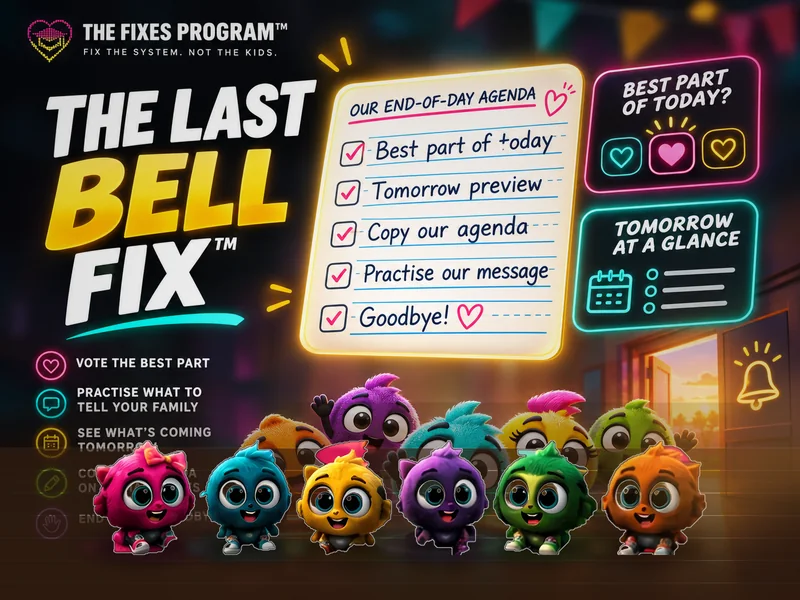
- 6steps, from best part to goodbye
- 0typing: tomorrow and the agenda build themselves
- 5–10minutes before the bell
- 0student accounts or names
The six steps
- Best part. “What was the best part of today?” Tap a card once for every hand. Most hearts wins. Something else covers the surprises.
- Take it home. The winner becomes “Tell your family about…”. A partner timer gets everyone practising the answer to the question every grown-up asks at pickup.
- Tomorrow. Tomorrow’s day appears by itself. With The Fixes Schedule on the same computer, gym, library and music show up automatically, with what to bring. Tap any reminder chips.
- Agenda. The date, the best part, tomorrow and reminders, on real primary writing lines. Short for K–1, full sentences for Grades 2–3, or one big line at a time.
- Our year. Every day’s best part joins the class timeline. Fridays become a week in review. By June your class has its own year in review.
- Goodbye. A different goodbye every day, one tap to start The End of Day Race clean-up, and “See you tomorrow!” from the whole crew.
Why it works
Kids leave with an answer
“What did you do today?” gets a real answer, because the class chose it and practised saying it.
Letters on the lines
Every letter sits on the baseline and reaches the dashed line exactly, so copying into a communication book looks like the screen.
No planning pressure
Tomorrow and the agenda build themselves from your schedule. Nothing to prepare after a long day.
Student-led
Every step has a short “Leader says” line your helper can read aloud.
A year to look back on
The timeline saves one highlight a day. Great for report-card comments and the last week of June.
Private by design
Votes are a count of hands. No names, no accounts, saved only on your computer.
Questions teachers ask
- Which grades is it for?
- Kindergarten to Grade 3, where communication books and an end-of-day routine are standard. Older classes can use the best part, tomorrow and timeline steps.
- Do I need The Fixes Schedule?
- No. It works on its own with your own subject list. With the Schedule on the same computer, the best-part cards and tomorrow’s specials fill in automatically.
- What if I use a different computer?
- Settings and the timeline are saved per browser. Setting up on a new computer takes about a minute.
- Does it need the internet?
- Only to open the page. Everything else works once it is open.
Pairs well with
- The Good Morning Fix™ Start the day the same way it ends: calendar, counting the days of school, weather and community circle.
- The Fixes™ Schedule Now and Next all day, with clean-up countdowns. Its last block opens The Last Bell Fix.
- The End of Day Race™ The clean-up race that the goodbye step opens in one tap.
- The Daily Fix™ Today’s whole-class logic and math puzzle.
Try it today
Open thefixesprogram.com/run/last-bell/ ten minutes before the bell, tap the gear to add your class name and ask: “What was the best part of today?” That’s it.
The Last Bell Fix™ at a glance
- Who it’s for
- Kindergarten to Grade 3 classroom teachers
- What you do
- Close the day: the class votes the best part of today, practises what to tell their family, previews tomorrow and copies the agenda.
- Cost
- Free. No accounts, no logins, no student data.
- What you need
- No prep. One teacher screen or projector. No student devices.